Run Claude Code for Free Using Ollama (No API Bill, No Compromise)

If you've been using Claude Code — Anthropic's powerful agentic coding tool — you already know how good it is. The problem? The API bills can add up fast, especially if you're a student, indie developer, or just someone experimenting. A small team can easily burn through hundreds of dollars a month.
Here's the good news: you don't have to pay a single rupee to use Claude Code anymore.
Thanks to a recent update in Ollama (v0.14.0+), Claude Code now supports local and cloud open-source models out of the box. No hacks, no fragile adapters — just a clean, simple setup. This guide will walk you through everything, from installation to running your first AI-assisted coding session, completely free.
Quick note: If you've been exploring self-hosted AI tools, you might already be familiar with Moltbot (formerly OpenClaw) — a free, self-hosted AI assistant. This guide takes a similar philosophy — powerful AI, zero cloud cost — but focused entirely on your coding workflow.
#What Changed? Why This Works Now
Older guides for connecting Claude Code to non-Anthropic models were messy — requiring custom wrappers, brittle API shims, and constant maintenance. Every update risked breaking your setup.
That's changed. Ollama now speaks the Anthropic Messages API format natively. This means Claude Code can talk to any Ollama model the same way it talks to Anthropic's servers — no middle layer, no workarounds.
What you gain by going local or using free cloud tiers:
- Cost: Local models are completely free. Some cloud alternatives cost up to 98% less than Claude Opus.
- Privacy: Your code never leaves your machine.
- Speed: No network round trips when running locally.
- Flexibility: Switch between models without changing your workflow.
#Before You Begin: Does Your Machine Qualify?
This is the most important section to read before diving in. Local LLMs are hungry for RAM.
| RAM Available | What You Can Run | Experience |
|---|---|---|
| 8 GB | Very small models only | Not recommended for coding |
| 16 GB | Small models (7B–14B) | Rough — expect slow edits and retries |
| 32 GB | Mid-size models (24B–30B) | Good — comfortable for daily use |
| 64 GB+ | Large models (30B–70B) | Excellent — near-Claude quality |
The honest truth: If you have 16 GB RAM, local models will work but can feel sluggish for real coding tasks — more wrong edits, more retries. At 32 GB (Apple Silicon unified memory or PC RAM), it becomes genuinely productive. Below that, the free cloud model options covered later in this guide are a better bet.
#Step 1: Install Claude Code
First, you need Claude Code installed on your system.
macOS / Linux / WSL:
bashcurl -fsSL https://claude.ai/install.sh | bash
Windows (PowerShell):
powershellirm https://claude.ai/install.ps1 | iex
Windows (CMD):
cmdcurl -fsSL https://claude.ai/install.cmd -o install.cmd && install.cmd && del install.cmd
#Step 2: Install Ollama
Ollama is what makes this whole setup possible. It runs open-source models locally and now speaks Claude Code's language natively.
bashcurl -fsSL https://ollama.com/install.sh | sh
Once installed, Ollama runs as a background service on http://localhost:11434.
 Ollama — the easiest way to run open-source models locally while keeping your data safe
#Step 3: Pick and Pull a Model
This is where your RAM decides what you can run. Pull the model that matches your machine:
bash# Great starting point for 32 GB machines
ollama pull devstral-small-2

# Stronger coding ability, still works on 32 GB
ollama pull qwen3-coder:30b

# Good speed-to-quality tradeoff (quantized, lighter)
ollama pull glm4.7-flash:q8_0
Model cheat sheet by RAM:
| RAM | Recommended Model | Why |
|---|---|---|
| 16 GB | glm4.7-flash:q8_0 | Quantized, lighter footprint |
| 32 GB | devstral-small-2 | Best balance of speed + quality |
| 32 GB (prefer quality) | qwen3-coder:30b | Better output, slightly slower |
| 64 GB+ | qwen3-coder:30b or larger | Comfortable at full precision |
Tip: For coding tasks, always use a model that supports at least 64k tokens context length. Shorter context means Claude Code loses track of your codebase mid-session.
#Step 4: Connect Ollama to Claude Code
Now the magic part. You just need to set two environment variables to point Claude Code at Ollama instead of Anthropic's servers.
Add these to your ~/.zshrc or ~/.bashrc:
bashexport ANTHROPIC_AUTH_TOKEN="ollama"
export ANTHROPIC_BASE_URL="http://localhost:11434"
Then reload your shell:
bashsource ~/.zshrc
Run Claude Code with your local model:
bashclaude --model devstral-small-2
That's it. You're now running Claude Code completely free, on your own machine.
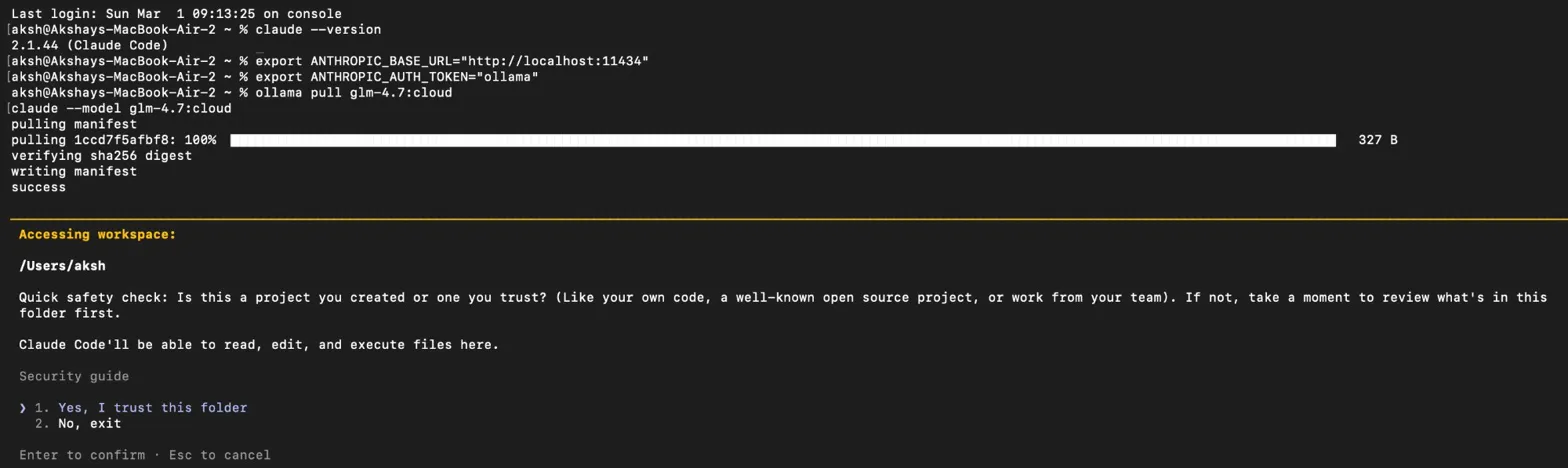 Claude Code v2.1.44 running successfully via glm-4.7:cloud on a MacBook Air — no local GPU needed
Alternatively, Ollama has a shortcut command that skips the manual env setup:
bashollama launch claude --model devstral-small-2
This auto-wires everything. Great for a quick start.
#Don't Have 32 GB RAM? Use Free Cloud Models
If your machine doesn't meet the RAM bar for local models, Ollama has a clever trick: :cloud variants. These run on Ollama's cloud infrastructure but use the exact same CLI commands as local models. No separate API keys to manage.
Pull a cloud model:
bashollama pull glm-4.7:cloud
ollama pull minimax-m2.1:cloud
Run it:
bashclaude --model glm-4.7:cloud
Same workflow, no local GPU required. Ollama's free tier has usage limits, but for students and casual coders it's more than enough for regular sessions.
#Using Ollama with the Anthropic SDK (For Developers)
If you're building apps with the Anthropic SDK, switching to Ollama is just a one-line change — swap the base_url.
Python:
pythonimport anthropic

client = anthropic.Anthropic(
    base_url='http://localhost:11434',
    api_key='ollama',  # required field, but ignored by Ollama
)

message = client.messages.create(
    model='qwen3-coder',
    messages=[{'role': 'user', 'content': 'Write a function to check if a number is prime'}]
)

print(message.content[0].text)
JavaScript:
javascriptimport Anthropic from '@anthropic-ai/sdk'

const anthropic = new Anthropic({
  baseURL: 'http://localhost:11434',
  apiKey: 'ollama',
})

const message = await anthropic.messages.create({
  model: 'qwen3-coder',
  messages: [{ role: 'user', content: 'Write a function to check if a number is prime' }],
})

console.log(message.content[0].text)
Your existing Anthropic-based apps will work with Ollama models with zero other changes.
#What Features Does Claude Code Still Support?
You might wonder if going local means losing features. Here's what works with Claude Code + Ollama:
| Feature | Supported? |
|---|---|
| Multi-turn conversations | ✅ Yes |
| Streaming responses | ✅ Yes |
| System prompts | ✅ Yes |
| Tool / function calling | ✅ Yes |
| Extended thinking | ✅ Yes |
| Vision (image input) | ✅ Yes |
The full feature set is there. The only real trade-off is model quality versus the flagship Claude Opus — which we address below.
#Honest Performance Expectations
Let's be real about what you can expect, because this guide won't sugar-coat it.
On a MacBook Pro M1 with 32 GB RAM:
devstral-small-2 (24B) runs at an acceptable speed for daily tasks. qwen3-coder:30b works but is noticeably slower — not ideal for quick iterations.
On a machine with 16 GB RAM:
Expect slower responses and occasional wrong edits that require re-prompting. The :cloud variants from Ollama will serve you better.
Quality vs Claude Opus: Open-source models at the 24B–30B range are genuinely impressive for routine coding — boilerplate, refactoring, debugging, writing tests. For complex architectural decisions or tricky algorithms, Claude Opus still has an edge. The free setup is not a perfect replacement, but for everyday coding tasks, it gets the job done.
#Choosing the Right Setup for You
| Your Situation | Best Option |
|---|---|
| 32 GB+ RAM, privacy-conscious | Local model via Ollama |
| Under 16 GB RAM | Ollama cloud model (free tier) |
| Want free + no setup | ollama launch claude --model glm-4.7:cloud |
| Building apps with Anthropic SDK | Swap base_url to Ollama (Python/JS example above) |
| Need the absolute best quality | Claude Opus via official API (paid) |
#A Note on What This Setup Is (and Isn't)
This guide solves the cost problem for Claude Code. It's ideal for:
- Students learning to code
- Indie developers prototyping ideas
- Anyone who wants to experiment without worrying about credits
It's not for you if:
- You need production-grade AI assistance at scale
- Your tasks regularly require Opus-level reasoning
- You want zero setup and don't mind paying
For those use cases, the official Anthropic API is still worth it. But for the rest of us? This free setup is a game-changer.
#Final Thoughts
Claude Code is one of the best agentic coding tools out there. The fact that you can now run it completely free — either locally on your own hardware or through Ollama's free cloud tier — is a massive win for students and developers on a budget.
The setup literally takes five minutes. Install Claude Code, install Ollama, pull a model, set two environment variables. That's the whole thing.
If you enjoyed this and want to explore more free self-hosted AI tools, check out our guide on Moltbot — a free, self-hosted AI assistant that runs on a $5/month VPS and connects to WhatsApp, Telegram, and more.
Have a model recommendation or a setup that works great on your machine? Drop a comment below — the community would love to hear it.
Related Articles
Akshay Kumar is a Full Stack Developer dedicated to building scalable web applications and AI-driven products. As an experienced Full Stack Developer, he specializes in the MERN stack and cloud innovations, sharing deep technical insights to help others master modern full stack development.
Stay Ahead of the Curve
Join 5,000+ developers receiving the latest tutorials, study guides, and internship opportunities directly in their inbox.
No spam, ever. Unsubscribe anytime.
Comments (0)
Log in to join the discussion