Moltbot: Run Your Own AI Assistant for $5/Month (No Mac Mini Needed)

#Moltbot: The AI Assistant That's Redefining Personal Productivity in 2026
Artificial Intelligence assistants have come a long way — from passive chatbots that sit in your browser tab to autonomous agents that actually get things done on your behalf. At the forefront of this transformation is Moltbot (formerly known as Clawdbot), an open-source, self-hosted AI assistant that's rapidly becoming the go-to tool for developers, creators, and productivity enthusiasts in 2026.
#What Is Moltbot?
Moltbot is not just another AI chatbot. It's a self-hosted AI agent you run on your own hardware or cloud instance that connects directly with the messaging apps you already use — like WhatsApp, Telegram, Discord, Slack, Signal, and even iMessage. Unlike traditional AI assistants, Moltbot doesn't just respond — it can act, remember, and proactively interact with you.
Here's what sets it apart:
- Persistent Memory: It stores context and conversation history locally, so it remembers you across sessions.
- Proactive Behavior: It can send you alerts, scheduling reminders, and daily briefings without waiting for a prompt.
- Actionable Abilities: Moltbot can execute terminal commands, automate workflows, manage emails and calendars, and perform browser tasks — all through simple chat.
- Multi-Platform Integration: Same assistant across multiple chat channels — any platform you prefer, one persistent Moltbot experience.
In essence, Moltbot aims to be your 24/7 AI assistant — always on, always learning, and fully under your control.
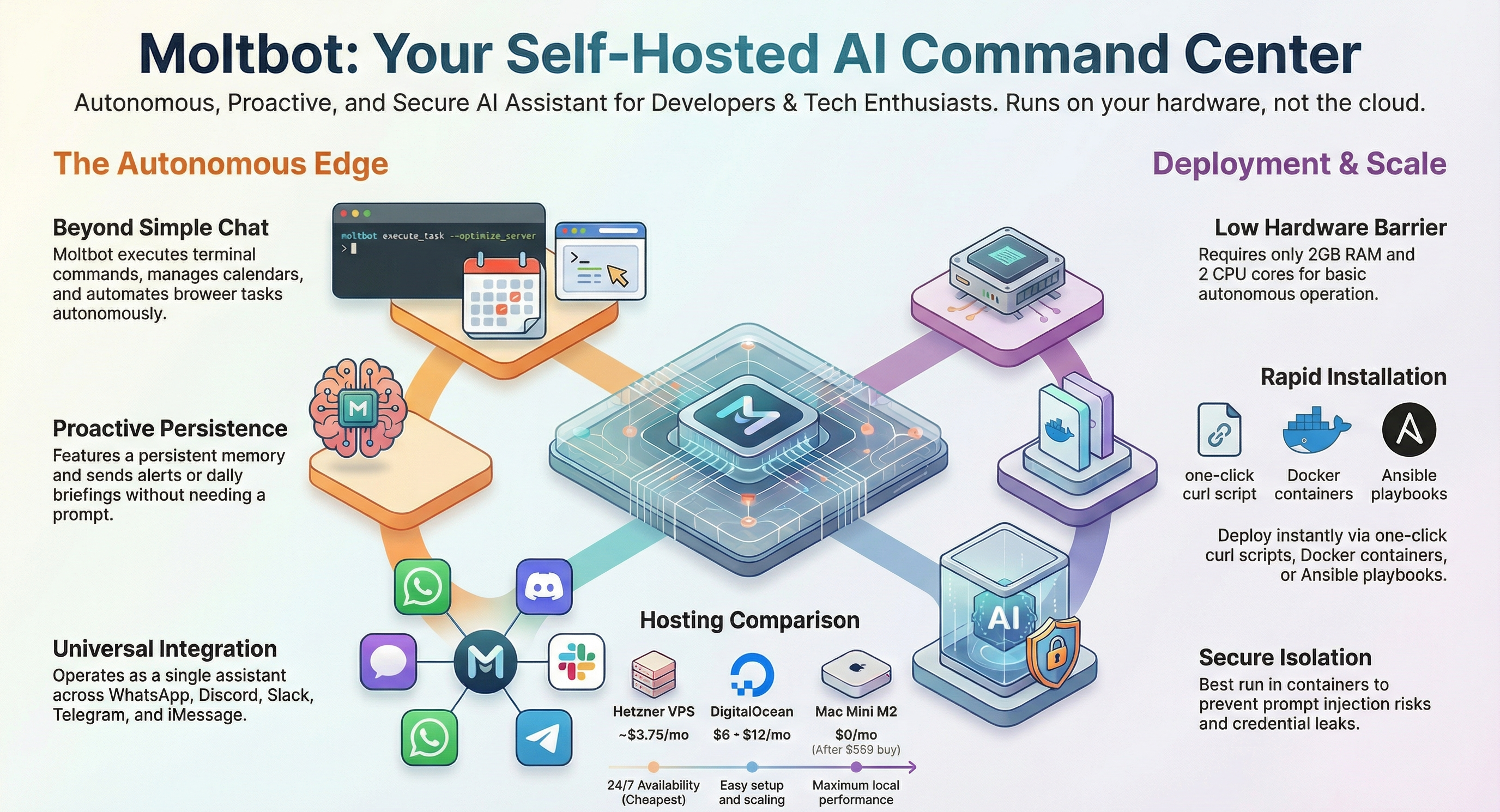
Figure: Moltbot's autonomous features, deployment options, and hosting comparison at a glance
#Why Moltbot Is Trending
Moltbot has exploded across developer communities and social platforms because it tackles one of the biggest frustrations with conventional AI: lack of real-world utility.
Here's why it's generating buzz:
- It actually performs tasks: Not limited to text replies, Moltbot can act autonomously to manage real tasks for you.
- Open-source momentum: With tens of thousands of GitHub stars and a growing contributor community, Moltbot has become a rallying point for AI builders.
- Flexibility and customizability: You run it where you want — on your laptop, a VPS, or even a cheap $3–$5/month server — and tailor it to your needs.
It's not just hype — developers are sharing real use cases, from automated travel bookings to smart reminders and even custom automation skills.
#How to Run Moltbot Anywhere (Not Just Mac Minis)
There's a common misconception that you need an expensive machine — like a Mac Mini — to run Moltbot. That's not true.
#Minimum Requirements
Most users can get started with modest hardware:
- 2 GB RAM and 2 CPU cores for basic chatting
- 4 GB+ RAM for automation and heavier tasks
- ~20 GB storage for workspace and logs
- Node.js installed
- Reliable internet (for cloud models)
This makes Moltbot accessible even on older computers, Raspberry Pis, or low-cost VPS instances.
#Deployment Options
You can deploy Moltbot in multiple ways:
- One-Click Installer: A simple curl script that detects your OS and installs everything needed.
- Docker: Run Moltbot inside containers alongside your other services.
- Ansible & Nix: For reproducible deployments at scale.
- Cloud Platforms: Railway, Render, or cheap VPS providers (like Hetzner or DigitalOcean) make always-on setups trivial.
Running Moltbot on a VPS often makes more sense than on local hardware because it offers better reliability, lower latency (if you pick the right region), and easier remote access.
#Quick Start Commands: Get Moltbot Running Today
Here are the most popular ways to deploy Moltbot, with ready-to-use commands:
#1. One-Click Installer (Easiest)
bashcurl -fsSL https://clawd.bot/install.sh | bash
Then run:
bashexec bash
This auto-detects your OS and installs everything you need.
#2. Docker Deployment
bashdocker pull clawdbot/clawdbot
docker run -d clawdbot/clawdbot
Perfect if you're already using Docker for other services.
#3. Ansible (For Automated Deployments)
bashansible-playbook clawdbot-ansible.yml
Great for scaling across multiple servers.
#4. Nix (For Reproducible Builds)
bashnix-shell -p clawdbot
Ideal for declarative, version-controlled deployments.
#5. Bun Runtime
bashbun install clawdbot
If you prefer Bun's faster JavaScript runtime.
#Complete DigitalOcean VPS Setup (Step-by-Step)
Here's a complete workflow for running Moltbot on a DigitalOcean droplet:
Step 1: Create a Droplet
- Choose Ubuntu 24.04 LTS
- Select your nearest region
- Pick Premium AMD: 2 GB RAM / 1 AMD CPU / 50 GB NVMe
Step 2: SSH into your server
bashssh root@YOUR_IP
Step 3: Create a sudo user
bashadduser clawd && usermod -aG sudo clawd && su - clawd
Step 4: Install Moltbot
bashcurl -fsSL https://clawd.bot/install.sh | bash
Then run:
bashexec bash
Step 5: Configure API keys
bashclawdbot setup --wizard
Follow the interactive setup to add your API keys (Anthropic Claude, OpenAI, etc.).
Step 6: Start the gateway
bashclawdbot gateway --bind lan --port 18789
Step 7: Access the UI via SSH tunnel
From your local machine:
bashssh -L 18789:127.0.0.1:18789 clawd@YOUR_IP
Then open your browser to:
http://127.0.0.1:18789
You're now running Moltbot 24/7 on a $6-12/month VPS!
#Real-World Use Cases
Moltbot's power lies in automation and persistence:
#Productivity
- Clean up and organize email
- Schedule appointments
- Provide daily briefings
#Automation
- Fill online forms automatically
- Execute shell tasks
- Manage your files and workflows
#Development
- Interact with GitHub through conversational prompts
- Assist with code debugging and scripting
Whether you're a developer or a power user, Moltbot can take repetitive tasks off your plate so you can focus on what matters.
#Cost Comparison: VPS vs Mac Mini
| Option | Upfront Cost | Monthly Cost | Best For |
|---|---|---|---|
| Hetzner VPS | $0 | €3.49 (~$3.75) | Cheapest option, 24/7 availability |
| DigitalOcean | $0 | $6-12/month | Easy setup with excellent docs |
| Railway | $0 | $5-20/month | One-click deploy, usage-based pricing |
| Render | $0 | $0 (free tier) | Free to start, upgrade as needed |
| Old Computer | $0 | $0 (electricity) | Free if you already own one |
| AWS Free Tier | $0 | $0 (12 months) | Free to start, complex pricing later |
| Raspberry Pi | ~$35-70 | ~$1-2 (electricity) | Ultra cheap, fun project |
| Mac Mini M2 | $599+ | $0 (electricity) | Maximum local performance |
The Bottom Line: A $5 VPS gives you 2-4 years of hosting before you break even with a Mac Mini purchase.
#Security: The Critical Bit You Can't Ignore
Moltbot is extremely powerful — which also makes it potentially risky if misconfigured.
- It often needs elevated access to perform tasks.
- Exposed instances on the public internet have led to credential leaks in the past.
- Prompt injection attacks and compromised messages are real threats if not isolated properly.
Best practices:
- Run Moltbot in containers or on isolated servers.
- Don't expose it to the public internet without authentication.
- Follow the official security documentation before linking sensitive accounts.
#Should You Use Moltbot?
Yes, if:
- You want a personal AI assistant that does things, not just chats.
- You're comfortable with setup and server management.
- You value control, privacy, and customization.
Maybe not if:
- You just need casual Q&A AI responses.
- You don't want to handle setup or security.
- You prefer cloud-only SaaS AI assistants.
Moltbot is built for makers and serious users — but once you tame the setup, it can become a productivity multiplier.
#Final Thoughts
Moltbot represents a new class of AI tooling — personal, powerful, autonomous, and open. It's not for everyone, but for builders and power users, it's a transformative evolution from passive chatbots to active digital assistants.
Akshay Kumar is a Full Stack Developer dedicated to building scalable web applications and AI-driven products. As an experienced Full Stack Developer, he specializes in the MERN stack and cloud innovations, sharing deep technical insights to help others master modern full stack development.
Stay Ahead of the Curve
Join 5,000+ developers receiving the latest tutorials, study guides, and internship opportunities directly in their inbox.
No spam, ever. Unsubscribe anytime.
Comments (0)
Log in to join the discussion